Data reference
In this extension, the term 'data reference' is used frequently. In this section we define this term.
Data references are OpenVX references to any of the OpenVX data types listed below,
- VX_TYPE_LUT
- VX_TYPE_DISTRIBUTION
- VX_TYPE_PYRAMID
- VX_TYPE_THRESHOLD
- VX_TYPE_MATRIX
- VX_TYPE_CONVOLUTION
- VX_TYPE_SCALAR
- VX_TYPE_ARRAY
- VX_TYPE_IMAGE
- VX_TYPE_REMAP
- VX_TYPE_OBJECT_ARRAY
- VX_TYPE_TENSOR (OpenVX 1.2 and above)
The APIs which operate on data references take as input a vx_reference type. An application can pass any of the above defined data type references to such an API.
Pipelining and Batch Processing
Pipelining and Batch Processing APIs allow an application to construct a graph which can be executed in a pipelined fashion (see Graph Pipelining), or batch processing fashion (see Graph Batch Processing).
Graph Parameter Queues
The concept of OpenVX "Graph Parameters" is defined in the main OpenVX spec as a means to expose external ports of a graph. Graph parameters enable the abstraction of the remaining graph ports which are not connected as graph parameters. Since graph pipelining and batching is concerned primarily with controlling the flow of data to and from the graph, OpenVX graph parameters provide a useful construct for enabling pipelining and batching.
This extension introduces the concept of graph parameter queueing to enable assigning multiple data objects to a graph parameter (either at once, or spaced in time) without needing to wait for the previous graph completion(s). At runtime, the application can utilize the vxGraphParameterEnqueueReadyRef function to enqueue a number of data references into a graph parameter to be used by the graph. Likewise, the application can use the vxGraphParameterDequeueDoneRef function to dequeue a number of data references from a graph parameter after the graph is done using them (thus, making them available for the application). The vxGraphParameterCheckDoneRef function is a non-blocking call that can be used to determine if there are references available for dequeuing, and if so, how many.
In order for the implementation to know which graph parameters it needs to support queuing on, the application should configure this by calling vxSetGraphScheduleConfig before calling vxVerifyGraph or vxScheduleGraph.
Graph Schedule Configuration
The graph schedule configuration function (vxSetGraphScheduleConfig) allows users to enable enqueuing of multiple input and output references to a graph parameter. It also allows users to control how the graph gets scheduled based on the references enqueued by the user.
The graph_schedule_mode parameter defines two modes of graph scheduling:
VX_GRAPH_SCHEDULE_MODE_QUEUE_MANUAL
- Here the application enqueues the references to be processed at a graph parameter
- Later when application calls
vxScheduleGraph, all the previously enqueued references get processed.
- Enqueuing multiple references and calling a single
vxScheduleGraph allows implementation flexibility to optimize the execution of the multiple graph executions based on the number of the enqueued references.
VX_GRAPH_SCHEDULE_MODE_QUEUE_AUTO
- Here also, the user enqueues the references that they want to process at a graph parameter
- However here user does not explicitly call
vxScheduleGraph
vxVerifyGraph must be called in this mode (since vxScheduleGraph is not called).- The implementation automatically triggers graph execution when it has enough enqueued references to start a graph execution
- Enqueuing multiple references without calling
vxScheduleGraph allows the implementation to start a graph execution as soon as minimal input or output references are available.
In both of these modes, vxProcessGraph is not allowed. The next two sections show how the graph schedule configuration, along with reference enqueue and dequeue is used to realize the graph pipelining and batch processing use-cases.
Example Graph pipelining application
Graph pipelining allow users to schedule a graph multiple times, without having to wait for a graph execution to complete. Each such execution of the graph operates on different input or output references.
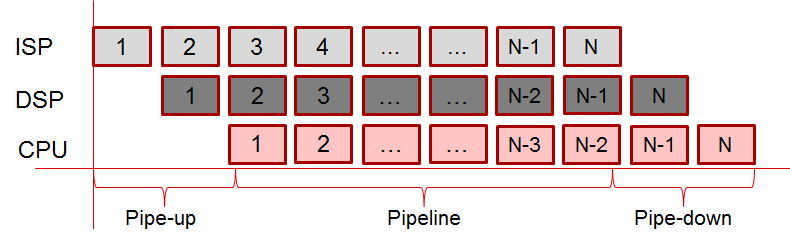
In a typical pipeline execution model, there is a pipe-up phase where new inputs are enqueued and graph is scheduled multiple times until the pipeline is full. Once the pipeline is full, then outputs begin to be filled as often as inputs are enqueued (as shown in Figure_1-3).
In order for the graph to be executed in a pipelined fashion, the steps outlined below need to be followed by an application:
- Create a graph and add nodes to the graph as usual.
- For data references which need to be enqueued and dequeued by the application, add them as graph parameters.
- Call
vxSetGraphScheduleConfig with the parameters as follows:
- Set scheduling mode (
VX_GRAPH_SCHEDULE_MODE_QUEUE_MANUAL or VX_GRAPH_SCHEDULE_MODE_QUEUE_AUTO).
- List the graph parameters on which enqueue / dequeue operations are required.
- For these parameters specify the list of references that could be enqueued later.
- All other data references created in, and associated with, the graph are made specific to the graph. A data reference can be made specific to a graph by either creating it as virtual or by exporting and re-importing the graph using the import/export extension.
- Delays in the graph, if any, MUST be set to auto-age using
vxRegisterAutoAging.
- Verify the graph using
vxVerifyGraph.
- Now data reference enqueue / dequeue can be done on associated graph parameters using
vxGraphParameterEnqueueReadyRef and vxGraphParameterDequeueDoneRef.
- Graph execution on enqueued parameters depends on the scheduling mode chosen:
VX_GRAPH_SCHEDULE_MODE_QUEUE_MANUAL: User manually schedules the graph on the full set of all enqueued parameters by calling vxScheduleGraph. This gives more control to the application to limit when the graph execution on enqueued parameters can begin.VX_GRAPH_SCHEDULE_MODE_QUEUE_AUTO: Implementation automatically schedules graph as long as enough data is enqueued to it. This gives more control to the implementation to decide when the graph execution on enqueued parameters can begin.
vxGraphParameterCheckDoneRef can be used to determine when to dequeue graph parameters for completed graph executions.- In order to gracefully end graph pipelining, the application should cease enqueing graph parameters, and call
vxWaitGraph to wait for the in-flight graph executions to complete. When the call returns, call vxGraphParameterDequeueDoneRef on all the graph parameters to return control of the buffers to the application.
The following code offers an example of the process outlined above, using VX_GRAPH_SCHEDULE_MODE_QUEUE_AUTO scheduling mode.
#define GRAPH_PARAMETER_IN (0u)
#define GRAPH_PARAMETER_OUT (1u)
#define GRAPH_PARAMETER_MAX (2u)
void add_graph_parameter_by_node_index(vx_graph graph, vx_node node, vx_uint32 node_parameter_index)
{
vx_parameter parameter = vxGetParameterByIndex(node, node_parameter_index);
vxAddParameterToGraph(graph, parameter);
vxReleaseParameter(¶meter);
}
static vx_graph create_graph(vx_context context, vx_uint32 width, vx_uint32 height)
{
vx_graph graph;
vx_node n0, n1;
vx_image tmp_img;
vx_int32 shift;
vx_scalar s0;
graph = vxCreateGraph(context);
tmp_img = vxCreateVirtualImage(graph, 0, 0, VX_DF_IMAGE_VIRT);
n0 = vxChannelExtractNode(graph, NULL, VX_CHANNEL_G, tmp_img);
shift = 8;
s0 = vxCreateScalar(context, VX_TYPE_INT32, &shift);
n1 = vxConvertDepthNode(graph, tmp_img, NULL, VX_CONVERT_POLICY_SATURATE, s0);
add_graph_parameter_by_node_index(graph, n0, 0);
add_graph_parameter_by_node_index(graph, n1, 1);
vxReleaseScalar(&s0);
vxReleaseNode(&n0);
vxReleaseNode(&n1);
vxReleaseImage(&tmp_img);
return graph;
}
static void enqueue_input(vx_graph graph, vx_uint32 width, vx_uint32 height, vx_image in_img)
{
vx_rectangle_t rect = { 0, 0, width, height};
vx_imagepatch_addressing_t imagepatch_addr;
vx_map_id map_id;
void *user_ptr;
if(in_img!=NULL)
{
vxMapImagePatch(in_img, &rect, 0, &map_id, &imagepatch_addr, &user_ptr, VX_WRITE_ONLY, VX_MEMORY_TYPE_NONE, VX_NOGAP_X);
vxUnmapImagePatch(in_img, map_id);
}
}
static void dequeue_input(vx_graph graph, vx_image *in_img)
{
vx_uint32 num_refs;
*in_img = NULL;
}
static void enqueue_output(vx_graph graph, vx_image out_img)
{
if(out_img!=NULL)
{
}
}
static vx_bool is_output_available(vx_graph graph)
{
vx_uint32 num_refs;
return (num_refs > 0);
}
static void dequeue_output(vx_graph graph, vx_uint32 width, vx_uint32 height, vx_image *out_img)
{
vx_rectangle_t rect = { 0, 0, width, height};
vx_imagepatch_addressing_t imagepatch_addr;
vx_map_id map_id;
void *user_ptr;
vx_uint32 num_refs;
*out_img = NULL;
if(*out_img!=NULL)
{
vxMapImagePatch(*out_img, &rect, 0, &map_id, &imagepatch_addr, &user_ptr, VX_READ_ONLY, VX_MEMORY_TYPE_NONE, VX_NOGAP_X);
vxUnmapImagePatch(*out_img, map_id);
}
}
#define GRAPH_PARAMETER_IN_MAX_REFS (2u)
#define GRAPH_PARAMETER_OUT_MAX_REFS (2u)
void vx_khr_pipelining()
{
vx_uint32 width = 640, height = 480, i;
vx_context context;
vx_graph graph;
vx_image in_refs[GRAPH_PARAMETER_IN_MAX_REFS];
vx_image out_refs[GRAPH_PARAMETER_IN_MAX_REFS];
vx_image in_img, out_img;
context = vxCreateContext();
graph = create_graph(context, width, height);
create_data_refs(context, in_refs, out_refs, GRAPH_PARAMETER_IN_MAX_REFS, GRAPH_PARAMETER_OUT_MAX_REFS, width, height);
graph_parameters_queue_params_list[0].
refs_list_size = GRAPH_PARAMETER_IN_MAX_REFS;
graph_parameters_queue_params_list[0].
refs_list = (vx_reference*)&in_refs[0];
graph_parameters_queue_params_list[1].
refs_list_size = GRAPH_PARAMETER_OUT_MAX_REFS;
graph_parameters_queue_params_list[1].
refs_list = (vx_reference*)&out_refs[0];
GRAPH_PARAMETER_MAX,
graph_parameters_queue_params_list
);
vxVerifyGraph(graph);
for(i=0; i<GRAPH_PARAMETER_IN_MAX_REFS; i++)
{
enqueue_input(graph, width, height, in_refs[i]);
}
for(i=0; i<GRAPH_PARAMETER_OUT_MAX_REFS; i++)
{
enqueue_output(graph, out_refs[i]);
}
while(1)
{
dequeue_input(graph, &in_img);
dequeue_output(graph, width, height, &out_img);
enqueue_input(graph, width, height, in_img);
enqueue_output(graph, out_img);
if(CheckExit())
{
break;
}
}
vxWaitGraph(graph);
while( is_output_available(graph) )
{
dequeue_output(graph, width, height, &out_img);
}
vxReleaseGraph(&graph);
release_data_refs(in_refs, out_refs, GRAPH_PARAMETER_IN_MAX_REFS, GRAPH_PARAMETER_OUT_MAX_REFS);
vxReleaseContext(&context);
}
Example Batch processing application
In order for the graph to be executed in batch processing mode, the steps outlined below need to be followed by an application:
- Create a graph and add nodes to the graph as usual.
- For data references which need to be 'batched' by the application, add them as graph parameters.
- Call
vxSetGraphScheduleConfig with the parameters as follows:
- Set scheduling mode (
VX_GRAPH_SCHEDULE_MODE_QUEUE_MANUAL or VX_GRAPH_SCHEDULE_MODE_QUEUE_AUTO).
- List the graph parameters which will be batch processed.
- For these parameters specify the list of references that could be enqueued later for batch processing.
- All other data references created in, and associated with the graph are made specific to the graph. A data reference can be made specific to a graph by either creating it as virtual or by exporting and re-importing the graph using the import/export extension.
- Delays in the graph, if any, MUST be set to auto-age using
vxRegisterAutoAging.
- Verify the graph using
vxVerifyGraph.
- To execute the graph:
- Enqueue the data references which need to be processed in a batch using
vxGraphParameterEnqueueReadyRef.
- If scheduling mode was set to
VX_GRAPH_SCHEDULE_MODE_QUEUE_MANUAL, use vxScheduleGraph to trigger the batch processing.
- Use
vxWaitGraph to wait for the batch processing to complete.
- Dequeue the processed data references using
vxGraphParameterDequeueDoneRef.
The following code offers a example of the process outlined above using VX_GRAPH_SCHEDULE_MODE_QUEUE_MANUAL scheduling mode.
#define GRAPH_PARAMETER_MAX_BATCH_SIZE (10u)
void vx_khr_batch_processing()
{
vx_uint32 width = 640, height = 480, actual_batch_size;
vx_context context;
vx_graph graph;
vx_image in_refs[GRAPH_PARAMETER_MAX_BATCH_SIZE];
vx_image out_refs[GRAPH_PARAMETER_MAX_BATCH_SIZE];
context = vxCreateContext();
graph = create_graph(context, width, height);
create_data_refs(context, in_refs, out_refs, GRAPH_PARAMETER_MAX_BATCH_SIZE, GRAPH_PARAMETER_MAX_BATCH_SIZE, width, height);
graph_parameters_queue_params_list[0].
refs_list_size = GRAPH_PARAMETER_MAX_BATCH_SIZE;
graph_parameters_queue_params_list[0].
refs_list = (vx_reference*)&in_refs[0];
graph_parameters_queue_params_list[1].
refs_list_size = GRAPH_PARAMETER_MAX_BATCH_SIZE;
graph_parameters_queue_params_list[1].
refs_list = (vx_reference*)&out_refs[0];
GRAPH_PARAMETER_MAX,
graph_parameters_queue_params_list
);
vxVerifyGraph(graph);
while(1)
{
get_input_output_batch(in_refs, out_refs,
GRAPH_PARAMETER_MAX_BATCH_SIZE,
&actual_batch_size);
GRAPH_PARAMETER_IN,
(vx_reference*)&in_refs[0],
actual_batch_size);
graph,
GRAPH_PARAMETER_OUT,
(vx_reference*)&out_refs[0],
actual_batch_size);
vxScheduleGraph(graph);
vxWaitGraph(graph);
GRAPH_PARAMETER_IN,
(vx_reference*)&in_refs[0],
GRAPH_PARAMETER_MAX_BATCH_SIZE,
&actual_batch_size);
graph,
GRAPH_PARAMETER_OUT,
(vx_reference*)&out_refs[0],
GRAPH_PARAMETER_MAX_BATCH_SIZE,
&actual_batch_size);
if(CheckExit())
{
break;
}
}
vxReleaseGraph(&graph);
release_data_refs(in_refs, out_refs, GRAPH_PARAMETER_MAX_BATCH_SIZE, GRAPH_PARAMETER_MAX_BATCH_SIZE);
vxReleaseContext(&context);
}
Streaming
OpenVX APIs allow a user to construct a graph with source nodes and sink nodes. A source node is a node which takes no input and only outputs data to one or more data references. A sink node is a node which takes one or more data references as input but produces no output. For such a graph, graph execution can be started in streaming mode, wherein, user intervention is not needed to re-schedule the graph each time.
Source/sink user nodes
Source/sink user nodes are implemented using the existing user kernel OpenVX API.
The following is an example of streaming user source node where the data references are coming from a vendor specific capture device component:
static vx_status user_node_source_validate(vx_node node, const vx_reference parameters[], vx_uint32 num, vx_meta_format metas[])
{
return VX_SUCCESS;
}
static vx_status user_node_source_init(vx_node node, const vx_reference parameters[], vx_uint32 num)
{
vx_image img = (vx_image)parameters[0];
vx_uint32 width, height, i;
vx_enum df;
vxQueryImage(img, VX_IMAGE_WIDTH, &width, sizeof(vx_uint32));
vxQueryImage(img, VX_IMAGE_HEIGHT, &height, sizeof(vx_uint32));
vxQueryImage(img, VX_IMAGE_FORMAT, &df, sizeof(vx_enum));
CaptureDeviceOpen(&capture_dev, width, height, df);
CaptureDeviceAllocHandles(capture_dev, capture_refs_prime, MAX_CAPTURE_REFS_PRIME);
for(i=0; i<MAX_CAPTURE_REFS_PRIME; i++)
{
CaptureDeviceSwapHandles(capture_dev, capture_refs_prime[i], NULL);
}
CaptureDeviceStart(capture_dev);
return VX_SUCCESS;
}
static vx_status user_node_source_run(vx_node node, vx_reference parameters[], vx_uint32 num)
{
vx_reference empty_ref, full_ref;
empty_ref = parameters[0];
CaptureDeviceSwapHandles(capture_dev, empty_ref, &full_ref);
parameters[0] = full_ref;
return VX_SUCCESS;
}
static vx_status user_node_source_deinit(vx_node node, const vx_reference parameters[], vx_uint32 num)
{
CaptureDeviceStop(capture_dev);
CaptureDeviceFreeHandles(capture_dev, capture_refs_prime, MAX_CAPTURE_REFS_PRIME);
CaptureDeviceClose(&capture_dev);
return VX_SUCCESS;
}
static void user_node_source_add(vx_context context)
{
vxAllocateUserKernelId(context, &user_node_source_kernel_id);
user_node_source_kernel = vxAddUserKernel(
context,
"user_kernel.source",
user_node_source_kernel_id,
(vx_kernel_f)user_node_source_run,
1,
user_node_source_validate,
user_node_source_init,
user_node_source_deinit
);
vxAddParameterToKernel(user_node_source_kernel,
0,
VX_OUTPUT,
VX_TYPE_IMAGE,
VX_PARAMETER_STATE_REQUIRED
);
vxFinalizeKernel(user_node_source_kernel);
}
static void user_node_source_remove()
{
vxRemoveKernel(user_node_source_kernel);
}
static vx_node user_node_source_create_node(vx_graph graph, vx_image output)
{
vx_node node = NULL;
node = vxCreateGenericNode(graph, user_node_source_kernel);
vxSetParameterByIndex(node, 0, (vx_reference)output);
return node;
}
Likewise, the following is an example of streaming user sink node where the data references are going to a vendor specific display device component:
static vx_status user_node_sink_validate(vx_node node, const vx_reference parameters[], vx_uint32 num, vx_meta_format metas[])
{
return VX_SUCCESS;
}
static vx_status user_node_sink_init(vx_node node, const vx_reference parameters[], vx_uint32 num)
{
vx_image img = (vx_image)parameters[0];
vx_uint32 width, height;
vx_enum df;
vxQueryImage(img, VX_IMAGE_WIDTH, &width, sizeof(vx_uint32));
vxQueryImage(img, VX_IMAGE_HEIGHT, &height, sizeof(vx_uint32));
vxQueryImage(img, VX_IMAGE_FORMAT, &df, sizeof(vx_enum));
DisplayDeviceOpen(&display_dev, width, height, df);
return VX_SUCCESS;
}
static vx_status user_node_sink_run(vx_node node, vx_reference parameters[], vx_uint32 num)
{
vx_reference new_ref, old_ref;
new_ref = parameters[0];
DisplayDeviceSwapHandles(display_dev, new_ref, &old_ref);
parameters[0] = old_ref;
return VX_SUCCESS;
}
static vx_status user_node_sink_deinit(vx_node node, const vx_reference parameters[], vx_uint32 num)
{
DisplayDeviceClose(&display_dev);
return VX_SUCCESS;
}
static void user_node_sink_add(vx_context context)
{
vxAllocateUserKernelId(context, &user_node_sink_kernel_id);
user_node_sink_kernel = vxAddUserKernel(
context,
"user_kernel.sink",
user_node_sink_kernel_id,
(vx_kernel_f)user_node_sink_run,
1,
user_node_sink_validate,
user_node_sink_init,
user_node_sink_deinit
);
vxAddParameterToKernel(user_node_sink_kernel,
0,
VX_INPUT,
VX_TYPE_IMAGE,
VX_PARAMETER_STATE_REQUIRED
);
vxFinalizeKernel(user_node_sink_kernel);
}
static void user_node_sink_remove()
{
vxRemoveKernel(user_node_sink_kernel);
}
static vx_node user_node_sink_create_node(vx_graph graph, vx_image input)
{
vx_node node = NULL;
node = vxCreateGenericNode(graph, user_node_sink_kernel);
vxSetParameterByIndex(node, 0, (vx_reference)input);
return node;
}
In both these examples, the user node 'swaps' the reference provided by the implementation with another 'compatible' reference. This allows user nodes to implement zero-copy capture and display functions.
Graph streaming application
To execute a graph in streaming mode, the following steps need to followed by an application:
- Create a graph with source and sink nodes.
- All data references created in and associated with the graph are made specific to the graph. A data reference can be made specific to a graph by either creating it as virtual or by exporting and re-importing the graph using the import/export extension.
- Verify the graph using
vxVerifyGraph
- Start the streaming mode of graph execution using
vxStartGraphStreaming
- Now the graph gets re-scheduled continuously.
- The implementation automatically decides the re-schedule trigger condition.
- Sometimes a user node may want to stop the continuous graph execution due to end of stream or error condition detected within its node execution. In this case the user node should return an error status. When a error status is returned by the user node, the continuous graph execution is stopped.
- Application can use
vxWaitGraph to wait for streaming graph execution to stop on its own.
- Alternatively, user application can explicitly stop the streaming mode of execution using
vxStopGraphStreaming.
- In all cases, the continuous mode of graph execution is stopped at an implementation-defined logical boundary (e.g. after all previous graph executions have completed).
The following example code demonstrates how one can use these APIs in an application,
static vx_graph create_graph(vx_context context, vx_uint32 width, vx_uint32 height)
{
vx_graph graph;
vx_node n0, n1, node_source, node_sink;
vx_image in_img, tmp_img, out_img;
vx_int32 shift;
vx_scalar s0;
graph = vxCreateGraph(context);
in_img = vxCreateVirtualImage(graph, width, height, VX_DF_IMAGE_RGB);
node_source = user_node_source_create_node(graph, in_img);
tmp_img = vxCreateVirtualImage(graph, 0, 0, VX_DF_IMAGE_VIRT);
n0 = vxChannelExtractNode(graph, in_img, VX_CHANNEL_G, tmp_img);
out_img = vxCreateVirtualImage(graph, 0, 0, VX_DF_IMAGE_S16);
shift = 8;
s0 = vxCreateScalar(context, VX_TYPE_INT32, &shift);
n1 = vxConvertDepthNode(graph, tmp_img, out_img, VX_CONVERT_POLICY_SATURATE, s0);
node_sink = user_node_sink_create_node(graph, out_img);
vxReleaseScalar(&s0);
vxReleaseNode(&n0);
vxReleaseNode(&n1);
vxReleaseNode(&node_source);
vxReleaseNode(&node_sink);
vxReleaseImage(&tmp_img);
vxReleaseImage(&in_img);
vxReleaseImage(&out_img);
return graph;
}
void vx_khr_streaming_sample()
{
vx_uint32 width = 640, height = 480;
vx_context context = vxCreateContext();
vx_graph graph;
user_node_source_add(context);
user_node_sink_add(context);
graph = create_graph(context, width, height);
vxVerifyGraph(graph);
WaitExit();
vxReleaseGraph(&graph);
user_node_source_remove();
user_node_sink_remove();
vxReleaseContext(&context);
}
Event handling
Event handling APIs allow users to register conditions on a graph, based on which events are generated by the implementation. User applications can then wait for events and take appropriate action based on the received event. User-specified events can also be generated by the application so that all events can be handled at a centralized location. This simplifies the application state machine, and in the case of graph pipelining, it allows optimized scheduling of the graph.
Motivation for event handling
- Pipelining without events would need blocking calls on the data producers, consumers, and the graph itself. If there were multiple graphs or multiple data producers/consumers pipelined at different rates, one can see how the application logic can easily get complicated.
- Applications need a mechanism to allow input references to be dequeued before the full graph execution is completed. This allows implementations to have larger pipeline depths but at the same time have fewer queued references at a graph parameter.
Event handling application
Event handling APIs allow user the flexibility to do early dequeue of input references, and late enqueue of output references. It enables applications to effectively block at a single centralized location for both implementation-generated events as well as user-generated events. Event handling allows the graph to produce events which can then be used by the application. For example, if the thread had an event handler that is used to manage multiple graphs, consumers, and producers, then the events produced by the implementation could feed into this manager. Likewise, early dequeue of input can be achieved, if the event handler could use the graph parameter consumed events to trigger calls to vxGraphParameterEnqueueReadyRef, vxGraphParameterDequeueDoneRef.
The following code offers an example of the event handling.
static void clear_pending_events(vx_context context)
{
while(
vxWaitEvent(context, &event, vx_true_e)==VX_SUCCESS)
;
}
void vx_khr_pipelining_with_events()
{
vx_uint32 width = 640, height = 480, i;
vx_context context;
vx_graph graph;
vx_image in_refs[GRAPH_PARAMETER_IN_MAX_REFS];
vx_image out_refs[GRAPH_PARAMETER_IN_MAX_REFS];
vx_image in_img, out_img;
context = vxCreateContext();
graph = create_graph(context, width, height);
create_data_refs(context, in_refs, out_refs, GRAPH_PARAMETER_IN_MAX_REFS, GRAPH_PARAMETER_OUT_MAX_REFS, width, height);
graph_parameters_queue_params_list[0].
refs_list_size = GRAPH_PARAMETER_IN_MAX_REFS;
graph_parameters_queue_params_list[0].
refs_list = (vx_reference*)&in_refs[0];
graph_parameters_queue_params_list[1].
refs_list_size = GRAPH_PARAMETER_OUT_MAX_REFS;
graph_parameters_queue_params_list[1].
refs_list = (vx_reference*)&out_refs[0];
GRAPH_PARAMETER_MAX,
graph_parameters_queue_params_list
);
vxVerifyGraph(graph);
clear_pending_events(context);
for(i=0; i<GRAPH_PARAMETER_IN_MAX_REFS; i++)
{
enqueue_input(graph, width, height, in_refs[i]);
}
for(i=0; i<GRAPH_PARAMETER_OUT_MAX_REFS; i++)
{
enqueue_output(graph, out_refs[i]);
}
while(1)
{
&& event.
event_info.graph_parameter_consumed.graph == graph
&& event.
event_info.graph_parameter_consumed.graph_parameter_index == GRAPH_PARAMETER_IN
)
{
dequeue_input(graph, &in_img);
enqueue_input(graph, width, height, in_img);
}
else
&& event.
event_info.graph_parameter_consumed.graph == graph
&& event.
event_info.graph_parameter_consumed.graph_parameter_index == GRAPH_PARAMETER_OUT
)
{
dequeue_output(graph, width, height, &out_img);
enqueue_output(graph, out_img);
}
else
&& event.
event_info.user_event.user_event_id == 0xDEADBEEF
)
{
break;
}
}
vxWaitGraph(graph);
do {
dequeue_output(graph, width, height, &out_img);
} while(out_img!=NULL);
vxReleaseGraph(&graph);
release_data_refs(in_refs, out_refs, GRAPH_PARAMETER_IN_MAX_REFS, GRAPH_PARAMETER_OUT_MAX_REFS);
clear_pending_events(context);
vxReleaseContext(&context);
}

 1.8.11
